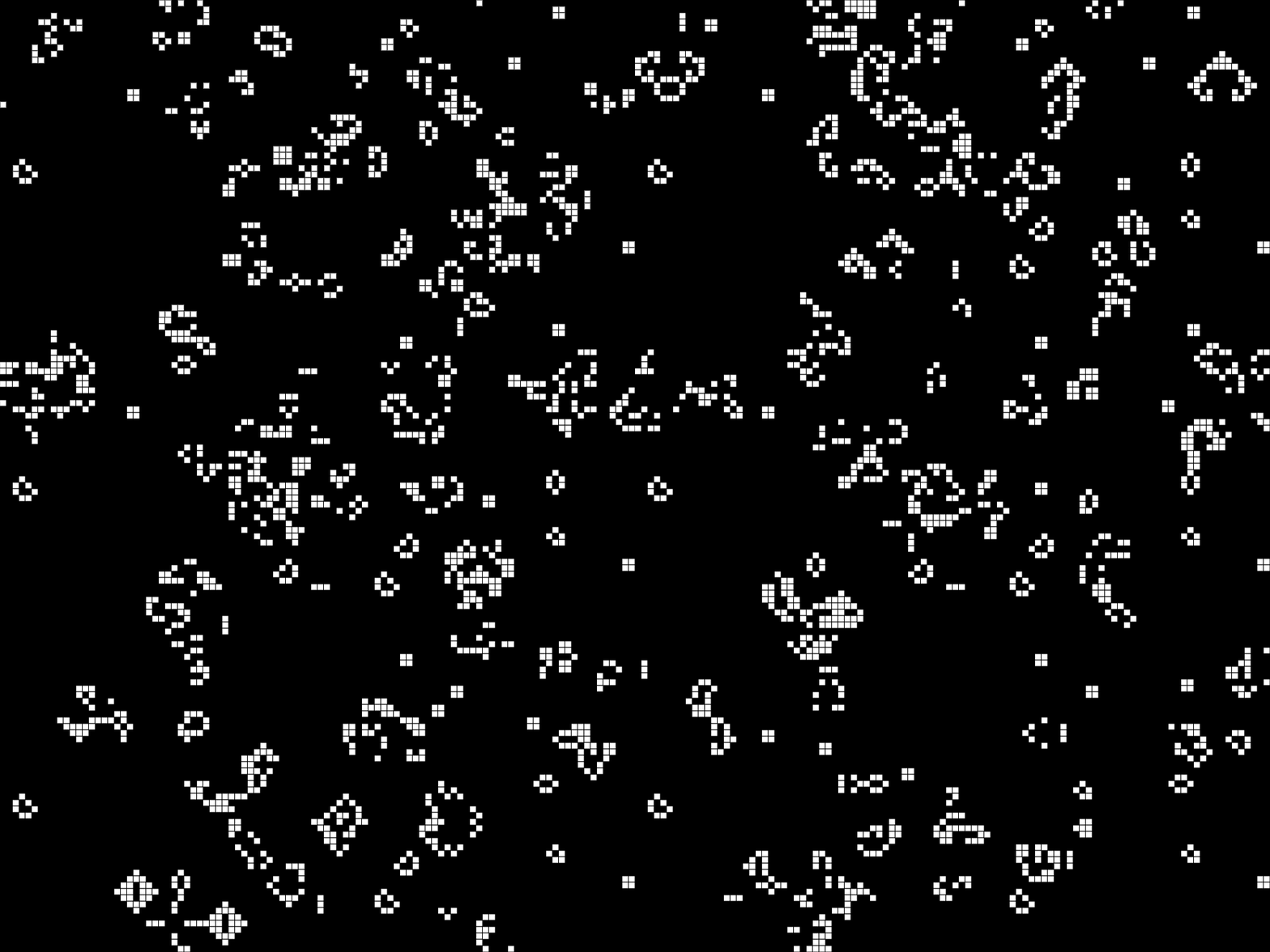
See those cells above? Flickering in and out of existence, forming patterns that seem almost alive?.
That’s Conway’s Game of Life, a simulation invented in 1970 that’s still mesmerizing people today. And by the end of this article, you’ll have built your own.
No downloads. No complicated setup. Just a browser, some curiosity, and about an afternoon of your time.
A Brief History of Living Pixels
In 1970, British mathematician John Conway was playing with pencil and paper in Cambridge, trying to create something unusual: a game that plays itself.
He wasn’t starting from scratch. Back in the 1940s, John von Neumann had been obsessing over self-replicating machines, robots that could build copies of themselves. His theoretical designs worked, but they required 29 different states per cell. Way too complex to actually run.
Conway wanted something simpler. He spent months tweaking rules, looking for a sweet spot: patterns that wouldn’t die instantly, but also wouldn’t explode to fill the entire universe. After countless experiments, he landed on just four rules.
When Martin Gardner published the Game of Life in Scientific American that October, it spread like wildfire. According to accounts from the time, a significant chunk of computing resources at universities and research labs got quietly diverted to watching these pixels dance.
Fifty years later, we’re still watching. And building.
Why This Is the Perfect First Project
If you’re new to creative coding, Game of Life teaches you more in one afternoon than most tutorials do in a month.
- You see results immediately: From your very first lines of code, there’s something on screen. No waiting, no abstract concepts floating in the void.
- Simple rules create complex behavior: This is the core lesson of generative art. You don’t need complicated algorithms to make beautiful things,you need the right simple rules and the patience to let them run.
- The concepts transfer everywhere.: Grids, loops, state management, iteration, these show up in almost every creative coding project you’ll ever build. Learn them once here, use them forever.
- Achievable: You can have a working simulation in under 80 lines of code. That’s not a weekend project. That’s a single sitting.
The Rules (Just Four)
The Game of Life runs on a grid where each cell is either alive or dead. Every generation, the grid updates based on these rules:
- Loneliness kills: Any living cell with fewer than two neighbors dies. Too isolated to survive.
- Community sustains: Any living cell with two or three neighbors lives on. Just the right amount of company.
- Overcrowding kills: Any living cell with more than three neighbors dies. Too cramped.
- Reproduction happens: Any dead cell with exactly three neighbors becomes alive. New life emerges.
💡 Scroll back up and watch the animation for a moment. Now you know what’s happening: every flicker is a cell being born or dying based on these four rules. Nothing more.
What makes this interesting is what happens when you zoom out. Individual cells follow dead-simple rules, but the patterns that emerge, gliders that travel across the screen, oscillators that pulse like heartbeats, structures that seem to have a mind of their own, none of that is written in the code. It emerges from the interactions.
This is emergence. And it’s the secret engine behind most generative art.
Let’s Build It
Open the p5.js web editor to start. We’re going to build this step by step, and you’ll see each piece working before we move on.
Step 1: Create the Grid
First, we need a grid to hold our cells. We’ll use a simple two-dimensional array, basically a grid of 1s and 0s, where 1 means alive and 0 means dead.
// --- GLOBAL VARIABLES ---
let grid;             // 2D array storing cell states (0 = dead, 1 = alive)
let cols;             // Number of columns in the grid
let rows;             // Number of rows in the grid
let resolution = 10;  // Size of each cell in pixels

// SETUP - Runs once at the start
function setup() {
  createCanvas(600, 400);

  // Calculate how many cells fit in the canvas
  cols = floor(width / resolution);   // 600 / 10 = 60 columns
  rows = floor(height / resolution);  // 400 / 10 = 40 rows

  // Create the grid filled with zeros (all dead)
  grid = create2DArray(cols, rows);
}

// HELPER: Create a 2D Array
// Returns a cols x rows array filled with zeros

function create2DArray(cols, rows) {
  let arr = new Array(cols);
  for (let i = 0; i < cols; i++) {
    arr[i] = new Array(rows).fill(0);
  }
  return arr;
}

function draw() {
  background(0);

  // Draw the grid lines
  stroke(70);
  for (let i = 0; i < cols; i++) {
    for (let j = 0; j < rows; j++) {
      let x = i * resolution;
      let y = j * resolution;

      noFill();
      rect(x, y, resolution, resolution);
    }
  }
}
Hit play. You should see an empty grid. Nothing exciting yet, but this is your universe. Every cell in this grid will soon have the potential for life.
Step 2: Populate the Grid
Now let’s give some cells a random chance at life. We’ll go through the grid and flip a coin for each cell.
Update your setup() function:
function setup() {
  createCanvas(600, 400);
  cols = floor(width / resolution);
  rows = floor(height / resolution);

  grid = create2DArray(cols, rows);

  // Randomly populate
  for (let i = 0; i < cols; i++) {
    for (let j = 0; j < rows; j++) {
      grid[i][j] = floor(random(2));  // Randomly 0 or 1
    }
  }
}
And update `draw()` to show living cells:
function draw() {
  background(0);

    // Render each cell
  for (let i = 0; i < cols; i++) {
    for (let j = 0; j < rows; j++) {
      let x = i * resolution;
      let y = j * resolution;

      if (grid[i][j] === 1) {
        fill(255);   // White for alive
        stroke(0);   // Black border
        rect(x, y, resolution, resolution);
      }
    }
  }
}
```
Step 3: Count Neighbors
Here’s where the logic lives. For each cell, we need to count how many of its eight neighbors are alive.
Add this function:
function countNeighbors(grid, x, y) {
  let sum = 0;

  // Loop through the 3x3 area centered on the cell
  // i and j range from -1 to 1, covering all 8 neighbors plus the cell itself
  for (let i = -1; i <= 1; i++) {
    for (let j = -1; j <= 1; j++) {
      // Calculate wrapped coordinates using modulo
      // Adding cols/rows before modulo handles negative values
      // Example: if x=0 and i=-1, then (0 + -1 + 60) % 60 = 59 (wraps to right edge)
      let col = (x + i + cols) % cols;
      let row = (y + j + rows) % rows;

      // Add the cell's value (0 or 1) to the sum
      sum += grid[col][row];
    }
  }

  // Subtract the center cell (we only want neighbors, not the cell itself)
  sum -= grid[x][y];
  return sum;
}
That % cols and % rows trick is important. It makes the grid wrap around, cells on the right edge see cells on the left edge as neighbors, and vice versa. Your grid becomes a torus, a donut-shaped universe where gliders can travel forever without hitting a wall.
Step 4: Apply the Rules
Now we implement the four rules. This is the heart of the simulation.
The tricky part: we can’t update cells as we go. If we change a cell’s state while we’re still counting neighbors for other cells, we’ll get wrong results. The rules say all cells update simultaneously.
Solution: we create a new grid for the next generation, fill it based on the current grid, then swap them.
// RULES:
// 1. UNDERPOPULATION: Live cell with < 2 neighbors dies
// 2. OVERPOPULATION:  Live cell with > 3 neighbors dies
// 3. REPRODUCTION:    Dead cell with exactly 3 neighbors becomes alive
// 4. SURVIVAL:        Live cell with 2 or 3 neighbors survives
//
function nextGeneration() {
  let next = create2DArray(cols, rows);

  for (let i = 0; i < cols; i++) {
    for (let j = 0; j < rows; j++) {
      let state = grid[i][j];
      let neighbors = countNeighbors(grid, i, j);

      if (state === 0 && neighbors === 3) {
        // Dead cell with 3 neighbors: birth
        next[i][j] = 1;
      } else if (state === 1 && (neighbors < 2 || neighbors > 3)) {
        // Living cell with too few or too many neighbors: death
        next[i][j] = 0;
      } else {
        // Stays the same
        next[i][j] = state;
      }
    }
  }

  return next;
}
Step 5: Run the Loop
Finally, let’s make it animate. Update your `draw()` function to call `nextGeneration()`:
// ============================================
// DRAW - Runs every frame
function draw() {
  background(0);

  // Render each cell
  for (let i = 0; i < cols; i++) {
    for (let j = 0; j < rows; j++) {
      let x = i * resolution;
      let y = j * resolution;

      if (grid[i][j] === 1) {
        fill(255);   // White for alive
        stroke(0);   // Black border
        rect(x, y, resolution, resolution);
      }
    }
  }

  // Advance to next generation
  grid = nextGeneration();
}
The Complete Code
Check the P5.js sketch here
// ============================================
// CONWAY'S GAME OF LIFE - Complete Code
// ============================================
// A cellular automaton where cells live or die
// based on simple rules about their neighbors.

// --- GLOBAL VARIABLES ---
let grid;             // 2D array storing cell states (0 = dead, 1 = alive)
let cols;             // Number of columns in the grid
let rows;             // Number of rows in the grid
let resolution = 10;  // Size of each cell in pixels

// ============================================
// SETUP - Runs once at the start
// ============================================
function setup() {
  createCanvas(600, 400);

  // Calculate how many cells fit in the canvas
  cols = floor(width / resolution);   // 600 / 10 = 60 columns
  rows = floor(height / resolution);  // 400 / 10 = 40 rows

  // Create the grid and fill it randomly
  grid = create2DArray(cols, rows);
  for (let i = 0; i < cols; i++) {
    for (let j = 0; j < rows; j++) {
      grid[i][j] = floor(random(2));  // Randomly 0 or 1
    }
  }
}

// ============================================
// HELPER: Create a 2D Array
// ============================================
// Returns a cols x rows array filled with zeros
function create2DArray(cols, rows) {
  let arr = new Array(cols);
  for (let i = 0; i < cols; i++) {
    arr[i] = new Array(rows).fill(0);
  }
  return arr;
}

// ============================================
// COUNT NEIGHBORS
// ============================================
// Counts living neighbors around cell at (x, y)
// The grid wraps around edges (toroidal topology)
//
//   [NW] [N] [NE]
//   [W]  [X] [E]     X = current cell
//   [SW] [S] [SE]    8 neighbors total
//
function countNeighbors(grid, x, y) {
  let sum = 0;

  // Check all 9 cells in a 3x3 area
  for (let i = -1; i <= 1; i++) {
    for (let j = -1; j <= 1; j++) {
      // Wrap around edges using modulo
      let col = (x + i + cols) % cols;
      let row = (y + j + rows) % rows;
      sum += grid[col][row];
    }
  }

  // Remove the center cell from count
  sum -= grid[x][y];

  return sum;  // Value between 0 and 8
}

// ============================================
// NEXT GENERATION
// ============================================
// Applies the rules to create the next state:
//
// RULES:
// 1. UNDERPOPULATION: Live cell with < 2 neighbors dies
// 2. OVERPOPULATION:  Live cell with > 3 neighbors dies
// 3. REPRODUCTION:    Dead cell with exactly 3 neighbors becomes alive
// 4. SURVIVAL:        Live cell with 2 or 3 neighbors survives
//
function nextGeneration() {
  // Create a new grid (we can't modify the current one while reading it)
  let next = create2DArray(cols, rows);

  // Apply rules to each cell
  for (let i = 0; i < cols; i++) {
    for (let j = 0; j < rows; j++) {
      let state = grid[i][j];
      let neighbors = countNeighbors(grid, i, j);

      if (state === 0 && neighbors === 3) {
        // Rule 3: Dead cell with 3 neighbors → born
        next[i][j] = 1;
      } else if (state === 1 && (neighbors < 2 || neighbors > 3)) {
        // Rules 1 & 2: Live cell with < 2 or > 3 neighbors → dies
        next[i][j] = 0;
      } else {
        // Rule 4: Cell stays the same
        next[i][j] = state;
      }
    }
  }

  return next;
}

// ============================================
// DRAW - Runs every frame
// ============================================
function draw() {
  background(0);

  // Render each cell
  for (let i = 0; i < cols; i++) {
    for (let j = 0; j < rows; j++) {
      let x = i * resolution;
      let y = j * resolution;

      if (grid[i][j] === 1) {
        fill(255);   // White for alive
        stroke(0);   // Black border
        rect(x, y, resolution, resolution);
      }
    }
  }

  // Advance to next generation
  grid = nextGeneration();
}
What You Just Learned
- Grids and 2D arrays: The backbone of pixel art, image processing, and countless generative systems.
- State management: Each cell holds state. The whole grid holds state. Managing state over time is how you build anything that evolves.
- Iteration: Loops within loops, scanning through every cell, every frame. This pattern shows up everywhere.
- Double buffering: You can’t update a system while you’re still reading from it. This insight applies to graphics, audio, simulations, anywhere data flows through time.
- Emergence: And this is the big one. You wrote rules for individual cells. You got behavior that looks like flocking, breathing, living. The gap between what you coded and what you see is where the magic happens.
This is how generative art works. Not by specifying every pixel, but by setting up conditions for complexity to emerge on its own.
What’s Next?
- Change the colors: What if cells fade out over several generations instead of disappearing instantly? Track how long each cell has been alive and map that to a color gradient.
- Change resolution: Make `resolution` smaller for a denser, more fluid simulation. Make it larger for chunky, readable patterns.
- Try classic patterns: Instead of random noise, look up classic patterns like the Gosper Glider Gun, a structure that shoots out gliders forever. Or the R-pentomino, a tiny five-cell shape that takes over 1,000 generations to stabilize.
- Break the rules: What happens with different neighbor counts for birth and survival? The notation B3/S23 means “birth with 3 neighbors, survive with 2 or 3.” Try B36/S23 (called HighLife) and watch for replicators, patterns that copy themselves.
If you want to keep learning, check out our guide to free p5.js tutorials or read about what p5.js actually is.
The animation at the top of this article? You just built it. Same rules, same logic. Welcome to creative coding.